

Visual Task Management for Every Design Stage
Every stage in your project has its own Kanban board. Move tasks from To Do to In Progress to Done with drag-and-drop. See what needs attention across your entire project at a glance — no complex setups or training required.
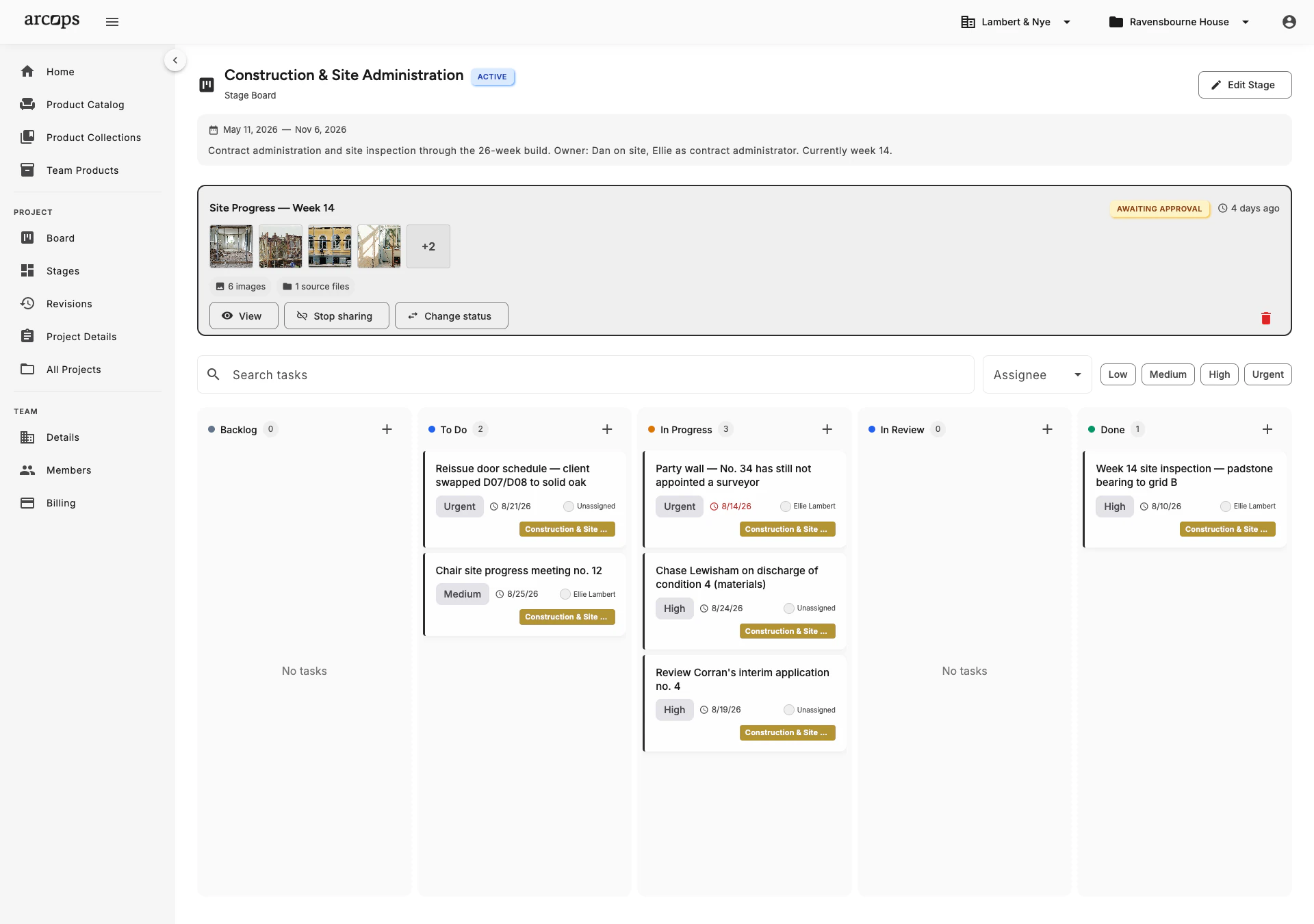
Move tasks between columns with a simple drag-and-drop. To Do, In Progress, Done — or create custom columns that match your workflow. No training needed.
Each project stage has its own Kanban board. Your “Material Selection” board tracks sourcing tasks while your “Installation” board tracks contractor coordination — completely independent.
Assign tasks to specific team members. Each person sees their tasks across all projects in a personal dashboard. Know who is working on what without asking.
Not Just Any Kanban — Tasks That Understand Your Products
ArcOps Kanban boards are not generic. Tasks can include file attachments, images, subtasks, and rich text descriptions. “Select dining table” includes the reference images and comparison notes — everything visible in the task detail.
Assign tasks to team members, set due dates, and add notes. Move tasks across columns with drag-and-drop. Each stage’s board is independent — your team works in parallel across multiple project phases.
Explore Product-Linked Tasks →0
Default columns — To Do, In Progress, Done — plus custom columns
0
Kanban board per stage for complete task isolation
0+
Products linkable to individual tasks
See All Your Active Tasks From One Dashboard
Personal dashboard shows your assigned tasks across all projects — prioritize your day in one view
Studio owners see task boards across all team projects — identify bottlenecks before they cause delays
Filter tasks by assignee, status, due date, or project to focus on what matters right now
Frequently Asked Questions
Yes. The default columns are To Do, In Progress, and Done, but you can add, rename, or reorder columns to match your workflow. Add columns like “Waiting for Client” or “Ordered” for procurement stages.
Yes. Every task can be assigned to one or more team members. Assignees see their tasks in a personal dashboard. In-app and email notifications are on the roadmap for Q1 2027.
Tasks support file attachments, images, subtasks, and rich text. Attach reference images, supplier quotes, or comparison notes directly to any task. Product-sourcing integration is launching Q3–Q4 2026.
Yes. Set due dates on individual tasks to track deadlines. Overdue tasks are highlighted in the Kanban board so nothing falls through the cracks.
ArcOps is designed for desktop-first workflows where designers do their detailed planning. Mobile access for quick status checks and task updates is on the roadmap.